Overview
MyPings.io is a global uptime and performance monitoring service built for developers and teams who care about the availability of their website or API.
Monitors
The core element of MyPings.io is a Monitor. A monitor is setup to constantly check a specific URL at regular intervals. Each monitor is checked at regular intervals from multiple regions around the world. Over time, this data helps you understand the performance and availability of your website or API.
Alerts & notifications
When a monitor transitions from healthy to degraded or down, MyPings.io can send an email alert and/or fire a webhook to warn you that your website or API is experiencing issues.
When the monitor recovers — that is, the next successful check arrives after an incident — MyPings.io automatically sends a recovery notification via the same channels. You'll receive a "back online" email and/or a recovery webhook so you know the incident has ended without having to log in to check.
Authentication
The MyPings.io API uses Bearer token authentication. All requests must
include a valid access token in the Authorization header.
Obtaining a token
Use the Cognito token endpoint to exchange your email and password for an access token:
curl -X POST \
  "https://cognito-idp.eu-west-1.amazonaws.com/" \
  -H "Content-Type: application/x-amz-json-1.1" \
  -H "X-Amz-Target: AWSCognitoIdentityProviderService.InitiateAuth" \
  -d '{
    "AuthFlow": "USER_PASSWORD_AUTH",
    "ClientId": "45i5tspgdd73hbd38lg20352e",
    "AuthParameters": {
      "USERNAME": "your-email@example.com",
      "PASSWORD": "your-password"
    }
  }'
The response contains an AuthenticationResult object. Use the
AccessToken field in your API requests.
Making authenticated requests
Include the access token as a Bearer token in the Authorization header of every API
request:
curl https://mypings.io/api/monitors \
  -H "Authorization: Bearer <your-access-token>"
Access tokens are valid for 24 hours. After expiry, repeat the authentication request to obtain a new token.
Monitors API
GET List monitors
Returns all monitors for the authenticated account.
curl https://mypings.io/api/monitors \
  -H "Authorization: Bearer <your-access-token>"
Returns 200 OK with an array of monitor objects:
[
  {
    "accountId": "abc123",
    "url": "https://example.com/health",
    "jobName": "My API",
    "jobGuid": "d4e5f6a7-b8c9-...",
    "frequencySeconds": 60,
    "timeoutMiliseconds": 5000,
    "expectedStatusCode": 200,
    "enabled": true,
    "headers": {
      "X-Api-Key": "secret"
    },
    "regions": ["eu-west-1", "us-east-1"],
    "dnsProvider": null,
    "alertConfig": {
      "alertingEnabled": true,
      "alertEmails": ["you@example.com"],
      "consecutiveFailuresRequired": 3,
      "minLocationsRequired": 1,
      "reminderIntervalMinutes": null,
      "webhooks": [
        { "type": "slack", "url": "https://hooks.slack.com/services/T000/B000/xxxx" },
        { "type": "custom", "url": "https://your-server.com/webhook", "headers": { "Authorization": "Bearer your-api-key" } }
      ]
    }
  }
]
POST Create a monitor
Creates a new monitor for the authenticated account.
curl -X POST https://mypings.io/api/monitors \
  -H "Authorization: Bearer <your-access-token>" \
  -H "Content-Type: application/json" \
  -d '{
    "jobName": "My API",
    "url": "https://example.com/health",
    "frequencySeconds": 60,
    "timeoutMiliseconds": 5000,
    "expectedStatusCode": 200,
    "enabled": true,
    "headers": {
      "X-Api-Key": "secret"
    },
    "regions": ["eu-west-1", "us-east-1"],
    "dnsProvider": null,
    "alertConfig": {
      "alertingEnabled": true,
      "alertEmails": ["you@example.com"],
      "consecutiveFailuresRequired": 3,
      "minLocationsRequired": 1,
      "reminderIntervalMinutes": 60,
      "webhooks": [
        { "type": "slack", "url": "https://hooks.slack.com/services/T000/B000/xxxx" },
        { "type": "custom", "url": "https://your-server.com/webhook", "headers": { "Authorization": "Bearer your-secret" } }
      ]
    }
  }'
Returns 201 Created on success.
Request body fields
| Field | Type | Required | Description |
|---|---|---|---|
jobName |
string | Yes | Display name for the monitor |
url |
string | Yes | URL to monitor |
frequencySeconds |
number | Yes | How often to run the check, in seconds. Minimum:
30
|
timeoutMiliseconds |
number | Yes | Request timeout in milliseconds |
expectedStatusCode |
number | Yes | HTTP status code considered a success. Default:
200
|
enabled |
boolean | Yes | Whether the monitor starts active immediately |
headers |
object | No | Custom HTTP request headers sent with each check, as key-value pairs |
regions |
string[] | No | List of regions to run checks from. Omit or set to
null to use all
available regions. See available regions below
|
dnsProvider |
string|null | No | DNS resolver to use. null uses the default
cloud resolver. Options:
"cloudflare" (1.1.1.1), "google" (8.8.8.8)
|
alertConfig |
object | No | Alert and notification settings. See alert config fields below |
Available regions
| Region ID | Location |
|---|---|
eu-west-1 |
Europe (Ireland) |
us-east-1 |
US East (N. Virginia) |
us-west-1 |
US West (N. California) |
ap-southeast-1 |
Asia Pacific (Singapore) |
ap-southeast-2 |
Asia Pacific (Sydney) |
Alert config fields
| Field | Type | Default | Description |
|---|---|---|---|
alertingEnabled |
boolean | true |
Whether alerts are active for this monitor |
alertEmails |
string[] | [] |
Email addresses to notify when an alert fires |
consecutiveFailuresRequired |
number | 3 |
Number of consecutive failing checks required before an alert is sent |
minLocationsRequired |
number | 1 |
Minimum number of regions that must be failing before an alert fires. Cannot exceed the number of selected regions |
reminderIntervalMinutes |
number|null | null |
How often (in minutes) to re-send alerts while the monitor
remains down. Minimum:
10. Set to null to disable reminders
|
webhooks |
array|null | null |
Up to 5 webhook destinations. Each entry is an object with
url (string), type ("custom",
"slack", or "discord"), and optional
headers (object, custom type only). See
Webhooks for details.
|
PUT Update alert config
Replaces the alert configuration for the specified monitor. Pass the complete alert config object — any fields omitted will revert to their defaults.
curl -X PUT https://mypings.io/api/monitors/<monitorid>/alerts \
  -H "Authorization: Bearer <your-access-token>" \
  -H "Content-Type: application/json" \
  -d '{
    "alertingEnabled": true,
    "alertEmails": ["you@example.com"],
    "consecutiveFailuresRequired": 3,
    "minLocationsRequired": 1,
    "reminderIntervalMinutes": 60,
    "webhooks": [
      { "type": "slack", "url": "https://hooks.slack.com/services/T000/B000/xxxx" },
      { "type": "custom", "url": "https://your-server.com/webhook", "headers": { "Authorization": "Bearer your-secret" } }
    ]
  }'
Returns 200 OK on success.
Request body fields
| Field | Type | Default | Description |
|---|---|---|---|
alertingEnabled |
boolean | true |
Whether alerts are active for this monitor |
alertEmails |
string[] | [] |
Email addresses to notify when an alert fires. Free plan accounts may only use their registered account email — upgrade to Basic or Pro to add additional addresses |
consecutiveFailuresRequired |
number | 3 |
Number of consecutive failing checks required before an
alert is sent. Minimum: 1 |
minLocationsRequired |
number | 1 |
Minimum number of regions that must be failing before an
alert fires. Minimum: 1. Cannot exceed the number of selected regions
|
reminderIntervalMinutes |
number|null | null |
How often (in minutes) to re-send alerts while the monitor
remains down. Minimum: 10. Set to null to disable
reminders |
webhooks |
array|null | null |
Up to 5 webhook destinations. Each entry: url
(required, valid HTTP/HTTPS), type ("custom",
"slack", or "discord"), and optional
headers object (custom type only).
|
DELETE Delete a monitor
Permanently deletes the specified monitor and stops all scheduled checks. This action cannot be undone.
curl -X DELETE https://mypings.io/api/monitors/<monitorid> \
  -H "Authorization: Bearer <your-access-token>"
Returns 200 OK on success, or 404 Not Found if the monitor does not
exist or does not belong to the authenticated account.
Executions API
Query the raw check results recorded for a monitor.
GET List executions
Returns a page of execution records for the specified monitor, ordered newest-first.
curl "https://mypings.io/api/monitors/<monitorid>/executions?timefromms=<ms>&timetoms=<ms>" \
  -H "Authorization: Bearer <your-access-token>"
Query parameters
| Parameter | Type | Required | Description |
|---|---|---|---|
timefromms |
number | No | Start of time range as Unix timestamp in milliseconds.
Defaults to 0 |
timetoms |
number | No | End of time range as Unix timestamp in milliseconds. Defaults to now |
cursorms |
number | No | Pagination cursor — the
request_start_timestamp_miliseconds_since_epoch of the last record on
the previous page
|
limit |
number | No | Maximum number of records to return. Defaults to
50, maximum 1000
|
statusfilter |
string | No | Filter by outcome. Use "success" or
"failure". Omit to return all results
|
Returns 200 OK with an array of execution objects:
[
  {
    "success": true,
    "timed_out": false,
    "url": "https://example.com/health",
    "dns_lookup_time": 1.23,
    "tcp_connecting_duration": 5.67,
    "tls_handshaking_duration": 12.34,
    "http_time_to_first_byte": 45.6,
    "http_receiving_body_duration": 2.1,
    "http_total_request_duration": 67.8,
    "entire_ping_job_execution_duration": 70.1,
    "http_req_failed": 0,
    "result_http_status_code": 200,
    "expected_status_code": 200,
    "http_data_sent_bytes_total": 512,
    "http_data_received_bytes_total": 2048,
    "http_data_sent_bytes_body_only": 0,
    "http_data_received_bytes_body_only": 1800,
    "remote_ip_address": "93.184.216.34",
    "node_ip_address": "10.0.1.5",
    "job_guid": "d4e5f6a7-b8c9-...",
    "request_start_timestamp_miliseconds_since_epoch": 1734567890123,
    "region": "eu-west-1",
    "node_id": "node-eu-west-1-a",
    "dns_provider": null
  }
]
Execution object fields
| Field | Type | Description |
|---|---|---|
success |
boolean | Whether the check passed — true when the
response status code matches expected_status_code and no timeout
occurred |
timed_out |
boolean | Whether the request exceeded the monitor's configured timeout before a response was received |
url |
string | The URL that was checked |
dns_lookup_time |
number (ms) | Time taken to resolve the hostname to an IP address |
tcp_connecting_duration |
number (ms) | Time taken to complete the TCP three-way handshake |
tls_handshaking_duration |
number (ms) | Time taken to complete the TLS handshake. 0
for plain HTTP connections |
http_time_to_first_byte |
number (ms) | Time from sending the request to receiving the first byte of the response (TTFB) |
http_receiving_body_duration |
number (ms) | Time taken to download the full response body after the first byte was received |
http_total_request_duration |
number (ms) | Total HTTP round-trip time: from sending the request to completing the response body download |
entire_ping_job_execution_duration |
number (ms) | End-to-end wall-clock time for the full check, including DNS, connection, request, and any internal overhead |
http_req_failed |
number | 0 if the HTTP request completed (regardless of
status code), 1 if it failed at the network or transport level |
result_http_status_code |
number | The HTTP status code returned by the server |
expected_status_code |
number | The HTTP status code the monitor is configured to expect. A
mismatch sets success to false |
http_data_sent_bytes_total |
number | Total bytes sent for the request, including headers |
http_data_received_bytes_total |
number | Total bytes received in the response, including headers |
http_data_sent_bytes_body_only |
number | Bytes sent as the request body (excluding headers) |
http_data_received_bytes_body_only |
number | Bytes received as the response body (excluding headers) |
remote_ip_address |
string | IP address of the server that handled the request |
node_ip_address |
string | Public IP address of the monitoring node that performed the check |
job_guid |
string | UUID uniquely identifying this execution |
request_start_timestamp_miliseconds_since_epoch |
number | Unix timestamp in milliseconds when the check started. Also used as the execution ID in the Get execution by ID endpoint |
region |
string | AWS region identifier of the monitoring node that performed
the check (e.g. eu-west-1) |
node_id |
string | Identifier of the specific monitoring node within the region |
dns_provider |
string | null | DNS resolver used by the monitoring node, if known.
null when not applicable or not detected
|
GET Get execution by ID
Returns a single execution record. The execution ID is the
request_start_timestamp_miliseconds_since_epoch value from a list executions
response.
curl "https://mypings.io/api/monitors/<monitorid>/executions/<executionid>" \
  -H "Authorization: Bearer <your-access-token>"
Returns 200 OK with a single execution object (same schema as above), or
404 Not Found if no matching execution exists.
Webhooks
Receive real-time alert notifications as HTTP POST requests to any URL you control — including Slack and Discord.
Overview
Each monitor supports up to 5 webhooks. When an alert fires, MyPings.io sends
an HTTP POST request to each configured webhook URL simultaneously. You can mix
webhook types on the same monitor — for example, send a Slack message and a custom JSON payload
at the same time.
Webhooks fire in two situations:
- Alert — when the configured consecutive failure threshold is met across the required number of locations. The same deduplication and reminder interval logic applies to webhooks as to emails.
- Recovery — when the first successful check arrives after an alert. A
recovery webhook is sent automatically to all configured webhook URLs, using a distinct
payload (
event: "alert.recovered") so you can distinguish it from an alert.
Webhook types
Each webhook has a type that controls the payload format sent to the URL:
| Type | Description |
|---|---|
custom — JSON Event |
Full JSON alert payload (see Custom payload below). Supports custom request headers for authentication. |
slack |
Slack Incoming Webhook message using Block Kit. Use the Slack webhook URL directly — no custom headers required. |
discord |
Discord webhook message with an embed. Use the Discord webhook URL directly — no custom headers required. |
Configuring webhooks
Add webhooks via the dashboard (expand the Alerts section when creating or
editing a monitor) or via the API using the webhooks array in the
alertConfig object:
curl -X PUT https://mypings.io/api/monitors/<monitorid> \
  -H "Authorization: Bearer <your-access-token>" \
  -H "Content-Type: application/json" \
  -d '{
    "alertConfig": {
      "alertEmails": [],
      "webhooks": [
        {
          "type": "slack",
          "url": "https://hooks.slack.com/services/T000/B000/xxxx"
        },
        {
          "type": "discord",
          "url": "https://discord.com/api/webhooks/000/xxxx"
        },
        {
          "type": "custom",
          "url": "https://your-server.com/webhook",
          "headers": {
            "Authorization": "Bearer my-secret-token"
          }
        }
      ],
      "consecutiveFailuresRequired": 3,
      "minLocationsRequired": 1
    }
  }'
Up to 5 webhooks per monitor. Webhooks and email alerts are independent — you can use one, both, or neither.
JSON Event payload (custom)
When type is "custom", MyPings.io sends a POST request
with Content-Type: application/json and the following body:
{
  "source": "mypings.io",
  "event": "alert.triggered",
  "monitor": {
    "id": "d4e5f6a7-b8c9-...",
    "name": "My API",
    "url": "https://example.com/health"
  },
  "alert": {
    "reason": "Monitor failed 3 consecutive times from 1 or more locations",
    "triggeredAtMs": 1734567890123,
    "triggeredAt": "2024-12-19T01:31:30.1230000Z",
    "failureRegion": "eu-west-1",
    "statusCode": 503,
    "expectedStatusCode": 200,
    "totalRequestDurationMs": 4821.5,
    "timedOut": false,
    "dnsProvider": null,
    "remoteIpAddress": "93.184.216.34",
    "nodeId": "node-eu-west-1-a"
  },
  "consecutiveFailures": [
    {
      "timestampMs": 1734567830000,
      "region": "eu-west-1",
      "statusCode": 503,
      "expectedStatusCode": 200,
      "totalRequestDurationMs": 4821.5,
      "timedOut": false
    },
    {
      "timestampMs": 1734567770000,
      "region": "eu-west-1",
      "statusCode": 503,
      "expectedStatusCode": 200,
      "totalRequestDurationMs": 4903.1,
      "timedOut": false
    },
    {
      "timestampMs": 1734567710000,
      "region": "eu-west-1",
      "statusCode": 503,
      "expectedStatusCode": 200,
      "totalRequestDurationMs": 4756.8,
      "timedOut": false
    }
  ]
}
Custom payload field reference
| Field | Type | Description |
|---|---|---|
source |
string | Always "mypings.io" |
event |
string | "alert.triggered" for failure alerts;
"alert.recovered" for recovery notifications
|
monitor.id |
string | Unique monitor ID (UUID) |
monitor.name |
string | Monitor display name |
monitor.url |
string | URL being monitored |
alert.reason |
string | Human-readable description of why the alert fired |
alert.triggeredAtMs |
number | Unix timestamp (milliseconds) of the triggering failure |
alert.triggeredAt |
string | ISO 8601 UTC timestamp of the triggering failure |
alert.failureRegion |
string | AWS region where the triggering failure occurred |
alert.statusCode |
number | HTTP status code received (0 if no response) |
alert.expectedStatusCode |
number | HTTP status code that was expected |
alert.totalRequestDurationMs |
number | Total request duration in milliseconds |
alert.timedOut |
boolean | true if the request timed out with no response
|
alert.dnsProvider |
string|null | DNS provider used for the check |
alert.remoteIpAddress |
string|null | IP address of the remote server |
alert.nodeId |
string|null | Internal node that performed the check |
consecutiveFailures |
array | The consecutive failing pings that triggered the alert, ordered newest first |
Recovery webhook payload
When a monitor recovers, the same webhook URLs receive a POST with
event: "alert.recovered". The payload is simpler — there are no failure details,
just the monitor identity and the time recovery was detected:
{
  "source": "mypings.io",
  "event": "alert.recovered",
  "monitor": {
    "id": "d4e5f6a7-b8c9-...",
    "name": "My API",
    "url": "https://example.com/health"
  },
  "recovery": {
    "recoveredAtMs": 1734568500000,
    "recoveredAt": "2024-12-19T01:41:40.0000000Z"
  }
}| Field | Type | Description |
|---|---|---|
event |
string | Always "alert.recovered" for recovery events
|
recovery.recoveredAtMs |
number | Unix timestamp (milliseconds) of the first successful check after the incident |
recovery.recoveredAt |
string | ISO 8601 UTC timestamp of the recovery |
Slack webhook
When type is "slack", MyPings.io sends a
Slack Incoming
Webhook
message using Block Kit. To set it up:
- In Slack, go to Apps → Incoming WebHooks and create a new webhook for your channel.
- Copy the webhook URL (it starts with
https://hooks.slack.com/services/…). - Add a new webhook on your monitor, choose Slack, and paste the URL.
No custom headers are needed — the URL already contains the authentication secret.
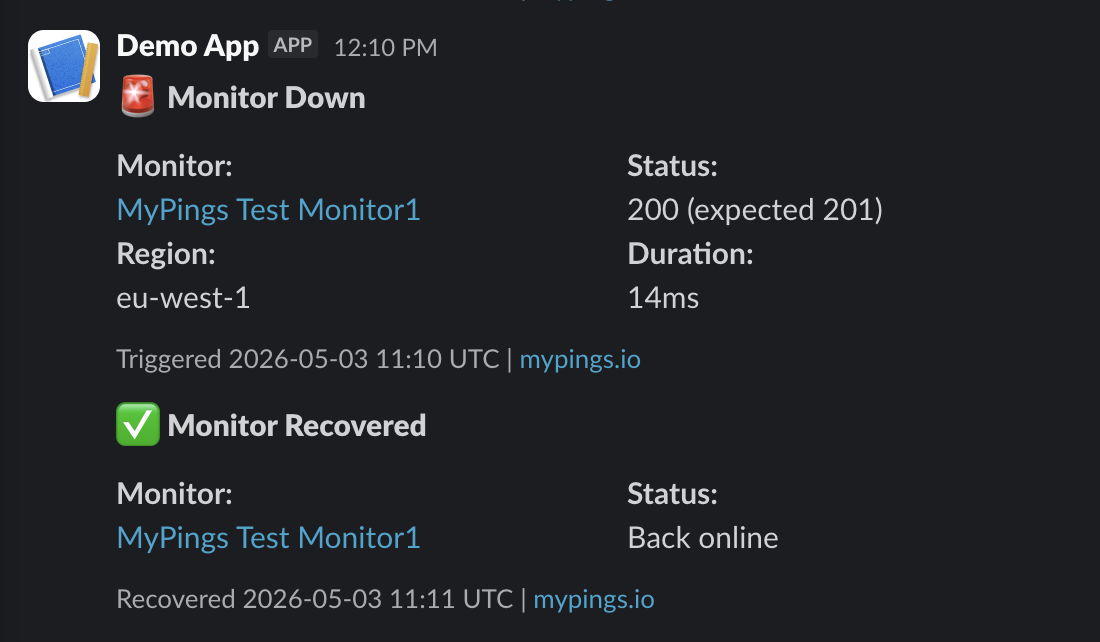
Alert messages appear with a red header and a Monitor Down title. Recovery messages use a green header and a Monitor Recovered title, so they are visually distinct in your channel.
Discord webhook
When type is "discord", MyPings.io sends a
Discord webhook
message with an embed. To set it up:
- In Discord, open your server settings → Integrations → Webhooks and create a new webhook for your channel.
- Copy the webhook URL (it starts with
https://discord.com/api/webhooks/…). - Add a new webhook on your monitor, choose Discord, and paste the URL.
No custom headers are needed — the URL already contains the authentication secret.
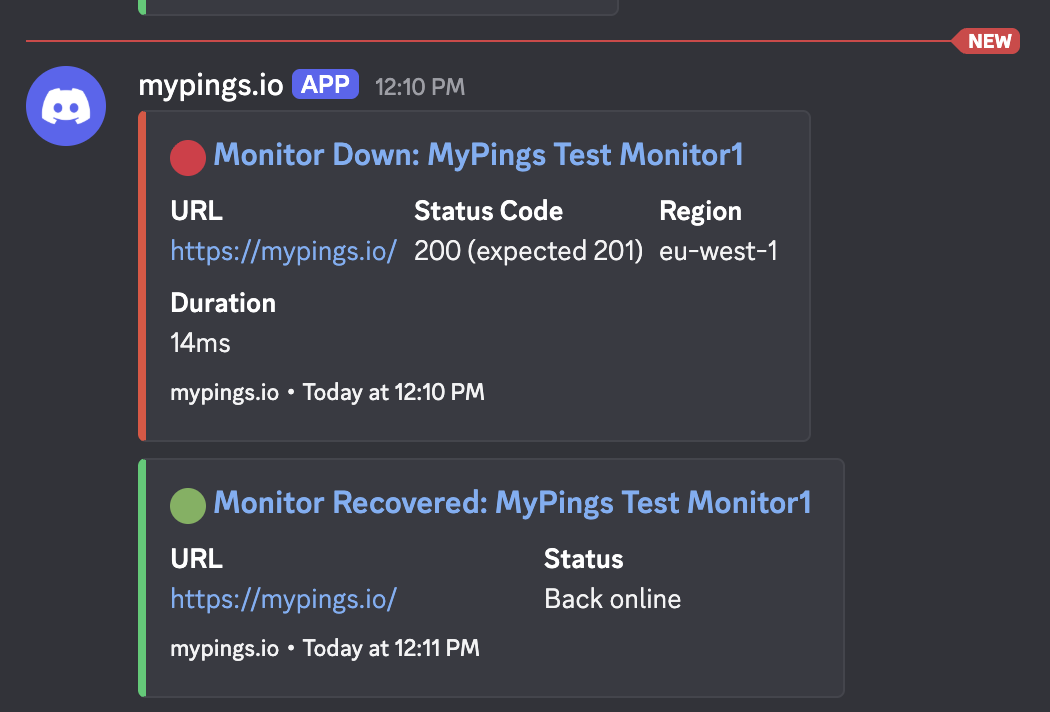
Alert embeds use a red colour. Recovery embeds use a green colour, with the title Monitor Recovered.
Responding to webhooks
Your endpoint must return a 2xx HTTP status code within 15 seconds to be considered
successful. If a non-2xx response is received or the request times out, MyPings.io will retry
the delivery up to 3 times.
Security
For custom webhooks, use HTTPS and add an
Authorization header (bearer token) or X-Webhook-Secret header
(shared secret) via the Headers section in the dashboard or the
headers field in the API. Your endpoint can then validate the header value before
processing the payload.
For Slack and Discord webhooks, authentication is handled by the URL itself — keep the URL private and do not share it publicly.
Our Story
Why we built MyPings.io, and what drives us.
MyPings.io was created to solve three problems with the existing monitoring platforms: cost, frequency of checks, and complexity. The cost of the existing solutions was often prohibitive for small teams and side projects, the frequency of checks was insufficient to catch issues in real-time, and the complexity of setup and management made it difficult for teams to effectively use the tools.
FAQ
Frequently asked questions about MyPings.io.
Q: How long is data retained?
A: Metrics are retained for 12 months before being deleted. Individual executions are retained for 6 months.
Q: What's the minimum time between checks allowed?
A: 30 seconds.
Q: Do you support adding headers to a monitor HTTP request?
A: Yes, you can add a maximum of 10 custom headers to your monitor.
Q: Are monitor executions from one location or many?
A: Checks are run from multiple AWS locations simultaneously. We currently have 5 locations:
- Europe (Ireland)
- US East (N. Virginia)
- US West (N. California)
- Asia Pacific (Singapore)
- Asia Pacific (Sydney)
Need a location not listed here? We can add more AWS locations on request — use the Suggestion Box in the menu when logged in to get in touch.
Q: Can I configure alerts to notify me if my website or web service goes down?
A: Yes, you can be notified via email or webhook when a monitor transitions to a degraded or down state. MyPings.io also sends a recovery notification automatically once the monitor passes a check after an incident, so you know the issue has resolved without needing to log in.